Retro — Photos with Friends
- 4.6
- Rating
- 1.00M
- Installs
- Free
- Price

 Analysis by App-foxy
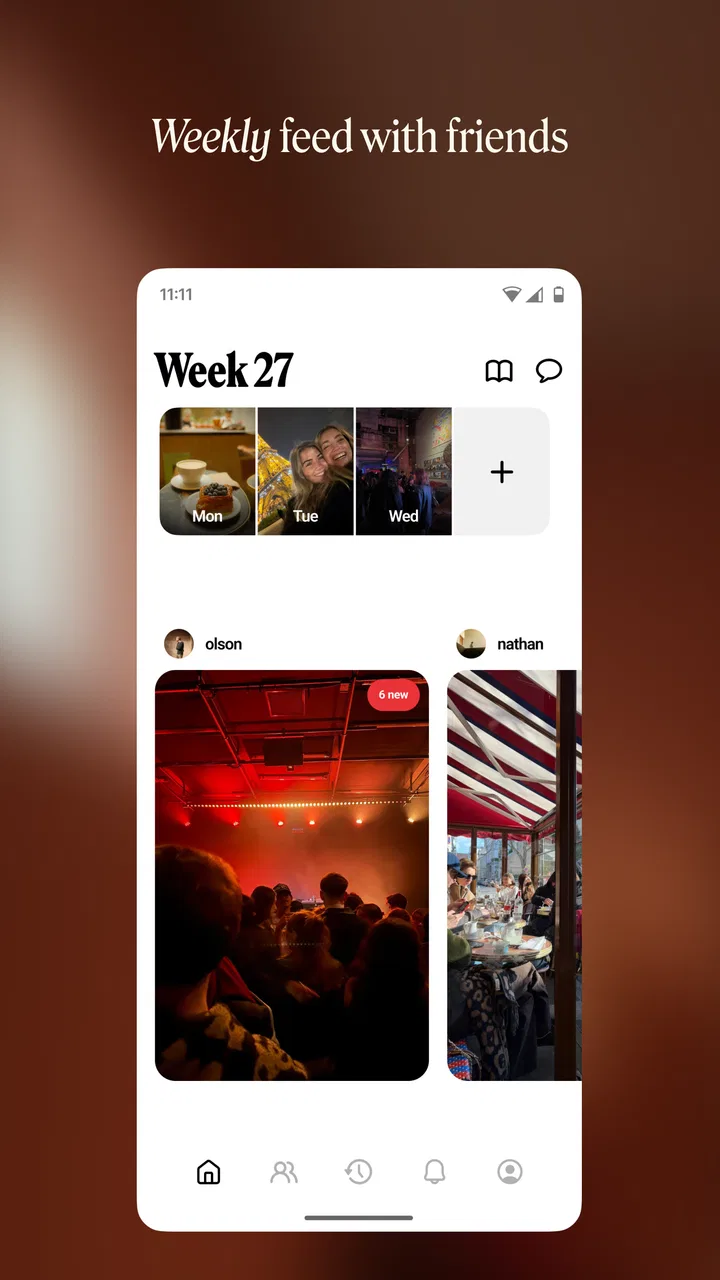
I enjoy photo apps that understand the difference between taking a picture and keeping a memory. Retro — Photos with Friends is built around that second idea. It is a free photography app from Lone Palm Labs that gives shared moments a more personal place to live, rather than treating every image as just another item in a camera roll. Its simple store summary points toward memories, albums, and widgets, while the short description reduces the mood to one word: retro. After spending time with it, I found that the appeal is less about replacing a full camera app and more about making selected photos feel present in everyday life.
The first thing I noticed is that the app works best when I stop expecting a complete photo-management system. I would not open it for professional editing, detailed cataloging, or a large collection that needs advanced search tools. I would open it after a weekend with friends, a family gathering, or a trip when I want a small group of pictures to remain visible and meaningful. That narrower purpose is also its strength. Retro is most convincing when used as a memory habit, not as another general-purpose gallery.
How I use Retro from the first photo to a repeatable memory habit
I use Retro most successfully when I treat the first photo selection as the beginning of a small routine, not a one-off setup task. I choose a few images that belong together, then decide what I want to keep visible and what should stay in my regular camera roll. That simple boundary makes it easier to return to the collection later, and it leads naturally to a practical question: where do people tend to get stuck?
You May Also Like

 Blood Strike: 2.5 Anniversary
Blood Strike’s Loadouts Turn Every Drop Into a Tactical Gamble
A close look at Blood Strike’s custom loadouts: how fast access to signature weapons reshapes its battle royale rhythm, rewards preparation, and narrows the gap between fights.

 Pandora - Music & Podcasts
Pandora’s Music Is Easy to Start, but Harder to Recover
Pandora’s strength is its low-effort path from a seed to a station. Its weak spot is how much confidence it asks you to place in connection, setup, and quiet recovery.

 8 Ball Pool
 Is Built on Rivalries, Rematches, and Routine
A close look at the rivalries, rematches, shared routines, and unanswered safety questions that turn a quick pool match into a persistent mobile community.

 Samsung Music
’s Quiet Strength Is Playing What You Already Own
Its reach comes less from spectacle than from dependable access to a personal library. That simplicity is both the app’s strongest retention engine and its ceiling.

 AccuWeather: Weather Radar
AccuWeather Review: A Quick, Clear Forecast for Everyday Decisions
For everyday plans, the best forecast is the one you can understand quickly. AccuWeather makes rain timing, radar, and local conditions easy to act on, with a few trade-offs.

 Hill Climb Racing
Why Hill Climb Racing Still Turns Crashes Into One More Run
A tiny car, a bumpy hill and one more upgrade: Hill Climb Racing keeps resurfacing because its simple chaos makes every near-miss feel personal.
More From Our News Desk
View All News


A calm starting workflow for shared moments
My baseline workflow is deliberately selective. I begin by choosing a small set of photos that represents an occasion instead of importing everything. A casual meal, for example, might produce dozens of pictures, but only a few usually carry the feeling of the evening. Picking those images first makes the resulting album easier to revisit and keeps the app from becoming a second, less organized camera roll.
That approach matters because Retro’s value depends on curation. If I add every duplicate, blurry snapshot, and accidental screenshot, the memory becomes noisy. If I choose the image of everyone arriving, the unplanned group photo, and one quiet detail from the table, the album tells a clearer story. This is a small but important difference from relying on the standard gallery on Android or iOS, where recent images are often mixed with work screenshots, downloads, and temporary pictures.
For a realistic everyday example, imagine meeting friends after work. I might take a few pictures during dinner, then later select the ones that show the people and atmosphere rather than the menu or every version of the same pose. I can then treat that selection as a compact record of the evening. The app feels more useful when I make that choice while the event is still fresh, because I remember why each photo matters.
The shared aspect also changes how I think about ownership. A normal gallery is usually centered on the person holding the phone. A memory-focused app makes me think about the group: which images would friends actually want to see again, and which ones are better left private in my personal camera roll? I appreciate that distinction because it encourages a more considerate workflow instead of automatically turning every personal image into a shared display.
Albums are better when they have a clear purpose
I get more from albums when I name or organize them around an occasion, relationship, or recurring activity. A broad collection called “Photos” tells me very little later. A focused group built around a birthday, a short trip, or monthly meetups gives me an immediate reason to open it. This is not a flashy technique, but it makes the difference between an album I revisit and one I forget.
I also prefer separate albums for events that look similar on the surface. Several family gatherings can blur together if they are all stored in one endless stream. Keeping them distinct makes the timeline of a relationship easier to follow. On the other hand, I would combine very small moments that do not justify their own collection, such as a few pictures from ordinary weekend walks. The trade-off is simple: too many albums create maintenance work, while too few reduce the emotional detail.
For someone moving from a usual gallery app, the adjustment is to stop thinking in terms of storage folders alone. The phone’s gallery is excellent for finding the newest image quickly. Retro’s album idea is more useful when I already know the memory I want to preserve. That makes it complementary to the built-in gallery rather than a universal replacement.
Widgets make the habit visible without opening the app
The widget-oriented side of the experience is important because it moves selected memories into the spaces I already look at during the day. Instead of waiting until I remember to browse an album, I can use a home-screen presence to keep the idea of revisiting photos in front of me. I found this more meaningful than repeatedly opening a gallery and scrolling through whatever happens to be newest.
The best use is not necessarily a huge collection. A small, carefully chosen set works better for a widget because repetition can be pleasant when the photos have emotional value. I would use one for a family group, a close friend, or a particular period of life. I would avoid filling it with random images simply because they are available. The widget is part of the memory design, so its selection deserves the same care as the album itself.
There is a practical question here: will a widget replace a notification or a messaging thread? In my experience, no. It serves a quieter purpose. A message asks me to respond, while a photo on the home screen gives me a brief reminder without demanding attention. That makes it especially suitable for people who want a gentle connection to shared memories rather than another stream of alerts.
Settings I would check before building a large collection
I recommend spending a few minutes reviewing the available settings before committing to a long-term workflow. The most important checks are not about making the app look impressive; they are about deciding how much involvement I want from it. I consider which albums should be visible, which images are appropriate for a shared context, and whether the home-screen presentation fits the way I use my phone.
Privacy is part of that preparation even when the app feels casual. Photos can include faces, locations, children, private conversations, or details from someone else’s life. I avoid adding an image merely because it is technically available in my gallery. If a picture includes people who might not want it displayed, I choose another or keep it outside the shared collection. This habit is more valuable than any decorative setting.
I also check how much repetition I am comfortable seeing. A memory widget can become background decoration if it changes too often or contains too many similar images. A more restrained selection usually gives each picture more impact. Experienced use, in my view, is not about activating every option; it is about reducing visual clutter so the feature remains noticeable.
Another useful check is whether the current app version behaves comfortably on my device. Retro’s current version is 2026.05.1006, and it requires Android 10 or newer. That makes the operating-system requirement relevant before installing on an older phone. On a supported device, I would still test the basic flow with a small album first: add a few photos, arrange the experience the way I like, and only then invest time in organizing a larger archive.
The app is free to install, although in-app purchases range from $1.99 to $35.99 per item. I would therefore explore the free experience before deciding whether any optional purchase fits my needs. For a memory app, the right question is not whether every extra is available, but whether the core routine already makes me return to my photos. If I do not enjoy the basic habit, paying for additional options will not solve that problem.
Shortcuts and repeatable patterns save more time than constant organizing
My faster pattern is to process photos in batches rather than trying to maintain everything immediately. After an event, I make one quick pass and select the strongest images. Later, when I have more time, I can refine the album. This avoids the common trap of turning a pleasant evening into an administrative task while the memory is still happening.
I also use a “one occasion, one decision” rule. When I return from an event, I decide whether it deserves its own album, belongs with an existing group, or should remain only in the phone’s regular gallery. That decision prevents a backlog of half-finished collections. It is particularly helpful for people who take many photos but rarely organize them because every picture seems to require a separate decision.
A second pattern is to create a small rotation of meaningful images rather than changing the selection constantly. This gives the widget and albums a recognizable identity. If I add new photos every day, older memories disappear before I have had time to appreciate them. If I update only when a genuinely important moment arrives, the change feels intentional.
I would also keep a lightweight cleanup routine. Every few weeks, I look at the collections and remove duplicates or images that no longer fit the purpose. The goal is not perfect archival management. It is to keep the app pleasant enough that I still want to open it. This is one of the less obvious strengths of a focused photo app: it can encourage better habits, but only if I resist treating it like a dumping ground.
For families or friend groups, a useful workflow is to let one person curate the first version and invite others to suggest better images informally. That avoids the chaos of everyone adding every photo while still respecting the shared nature of the memory. I would not use this approach for formal records or important documentation, where a more structured cloud album with clear ownership and search tools is safer.
Where Retro reaches its limits
The retro presentation is appealing, but it is also a specific taste. If I want extensive editing controls, manual color correction, RAW support, or a professional photography workflow, I would choose a dedicated camera or editing app instead. Retro is about the feeling around selected images, not about controlling every technical aspect of the photograph.
It is also not the obvious choice for someone whose main need is backup. A conventional cloud gallery remains better for searching a large library, recovering older images, sorting by dates, and handling a broad archive. Retro makes more sense after I have already decided which memories deserve attention. I would not rely on a small, curated experience as my only copy of important photos.
Another limitation is the effort required from the user. The app can make memories easier to revisit, but it cannot decide perfectly which images matter to me. The more personal the collection, the more useful my own judgment becomes. Someone who wants an entirely automatic system may find this curation tiring, especially if they already have years of unsorted photos.
The social angle also calls for restraint. A photo that looks harmless to me may feel uncomfortable to a friend, colleague, or family member. I would think twice before placing group images somewhere visible on my phone. This is not a reason to avoid the app; it is a reason to treat the selection process as part of using it responsibly.
Storage and organization can become friction points as a collection grows. I would start with a focused theme and monitor whether the app still feels easy to navigate. If the experience begins to resemble another crowded gallery, I would archive older memories elsewhere and keep Retro reserved for the moments I actively want in view. That boundary preserves its purpose.
The age rating is Everyone, which matches the straightforward photography concept and makes it approachable for general households. Even so, an Everyone rating does not remove the need for adult judgment around family pictures or shared displays. The content may be broadly suitable, while individual photos still deserve careful selection.
Who will enjoy it, and who should choose something else?
I would recommend Retro to people who take photos mainly to remember time with others. It is a good fit for someone who likes a nostalgic visual mood, wants selected images near the home screen, and is willing to curate rather than import an entire library. It also suits users who find ordinary galleries too functional and social feeds too noisy for personal memories.
I think it is especially useful for small recurring traditions: a monthly meal, regular walks with a pet, visits with relatives, or a long-distance friendship maintained through occasional meetups. A focused collection can show continuity that a standard recent-photo view hides. That is a more thoughtful use than treating the app as a novelty filter.
I would skip it if my priority is advanced editing, automatic backup, professional asset management, or a huge searchable archive. I would also hesitate if I dislike choosing and reviewing photos. In those cases, the built-in gallery, a cloud photo service, or a dedicated editing tool will probably be more efficient. Retro’s advantage comes from its narrower focus, and that same focus makes it unsuitable for some workflows.
The app has reached more than a million installs and holds a 4.6 average from roughly 8.1 thousand ratings, which suggests that its focused idea has found a substantial audience. I treat those figures as useful context rather than a guarantee. The real test is whether I enjoy the small ritual of choosing memories and seeing them again. A popular photography app can still be wrong for someone who wants automation or technical control.
My verdict after making the workflow intentional
Retro — Photos with Friends works because it turns photo organization into a visible, repeatable habit. I like it most when I use a small album, choose images with a clear emotional thread, and let the widget remind me of people or moments without demanding a response. The experience feels more personal than scrolling through a general gallery, yet lighter than maintaining a formal archive.
Its strongest lesson is that better photo memories do not require more photos. They require better selection. By separating everyday camera-roll storage from a curated memory space, the app gives me a reason to revisit images I would otherwise leave buried. That is a meaningful difference from the usual alternatives, even though those alternatives remain better for editing, backup, and large-scale organization.
I would install it for free and begin with one small occasion rather than trying to rebuild my entire photo history. I would test the album flow, review the display choices, and decide whether the widget genuinely adds warmth to my routine. If it does, the app can become a pleasant part of daily life. If it does not, I would return to the standard gallery without having complicated my photo workflow.
Overall, I see this photography app as a thoughtful companion for selected memories, not a replacement for every tool on the phone. Lone Palm Labs has kept the idea approachable, and the retro direction gives it a distinct personality without requiring a technical learning curve. My recommendation is simple: use Retro when you want to live with a few meaningful photos, not when you need to manage all of them.
FAQs for Retro — Photos with Friends
01What is Retro — Photos with Friends, and how does it work?
Retro — Photos with Friends is a social photography app that lets users take, share, and edit photos with a nostalgic, vintage touch. The app features a variety of filters and effects inspired by classic film and camera styles. Users can connect with friends, collaborate on photo albums, and share their creations directly on social media platforms.
02What unique features does Retro — Photos with Friends offer?
The app stands out with its extensive collection of vintage filters and effects that emulate classic cameras and films. It also offers collaborative albums where multiple users can contribute photos. Additionally, Retro includes a built-in community feature for sharing and discovering photos, along with a user-friendly interface that makes editing a breeze.
03Is Retro — Photos with Friends free to use?
Retro — Photos with Friends is free to download and use, with some basic features available at no cost. However, it offers in-app purchases for premium filters, additional editing tools, and an ad-free experience. Users can opt for a subscription model to unlock all features and exclusive content.
04How does Retro — Photos with Friends ensure user privacy and security?
The app prioritizes user privacy by implementing end-to-end encryption for all shared photos and data. Users have control over their privacy settings, allowing them to decide who can view or collaborate on their albums. Retro is committed to protecting user information and complies with GDPR and other data protection regulations.
05Can Retro — Photos with Friends be used offline?
Yes, Retro — Photos with Friends can be used offline for taking and editing photos. However, an internet connection is required to access collaborative features, share photos on social media, and sync with the app's community. Offline mode allows users to save their work and upload it once a connection is available.
Pros
- Nostalgic photo filters enhance memories.
- User-friendly interface for easy navigation.
- Real-time photo sharing with friends.
- Supports high-resolution image editing.
- No intrusive ads to disrupt experience.
Cons
- Limited filter options compared to competitors.
- Occasional app crashes during editing.
- Requires internet for full functionality.
- In-app purchases can be pricey.
- Lacks integration with cloud storage.

Retro — Photos with Friends
Gallery